
Home » Benefits Administration » Enrollment » 2025 Enrollment
2025 Enrollment
Navigate Benefit Information by Year:
You contribute to the cost of your benefits. For some of your elected health benefits – for example medical, dental, FSAs and HSA – your contributions are deducted from your paycheck on a pre-tax basis, and the money is taken out of your pay before the following taxes have been deducted:
- Federal income taxes
- State income taxes
- Social Security taxes
This means your current taxable income is lower and you pay less in taxes.
Your contributions for all other benefits where you purchase coverage, such as optional life insurance, spousal/domestic partner and/or child life insurance, accident, critical illness, hospital legal, and pet insurance are all post-tax.
To enroll, go to Paylocity. Then follow these easy steps.
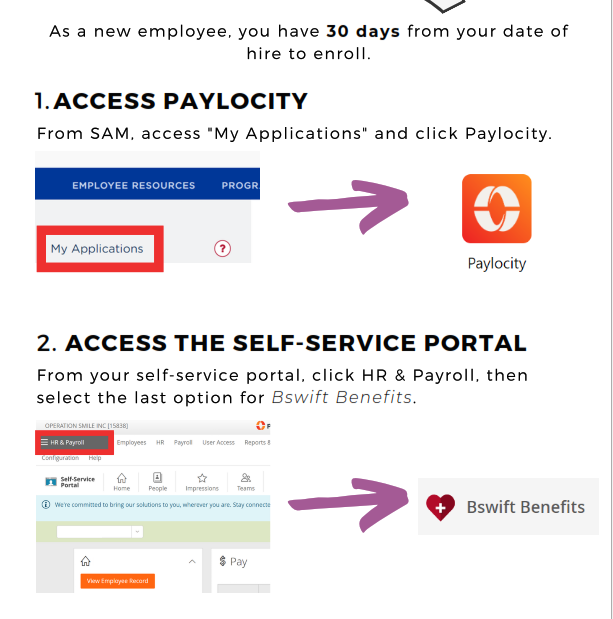
1.ACCESS PAYLOCITY From SAM, access “My Applications“ and click Paylocity .”
2.ACCESS THE SELF-SERVICE PORTAL From your self-service portal, click HR & Payroll, then select the last option for Bswift Benefits.
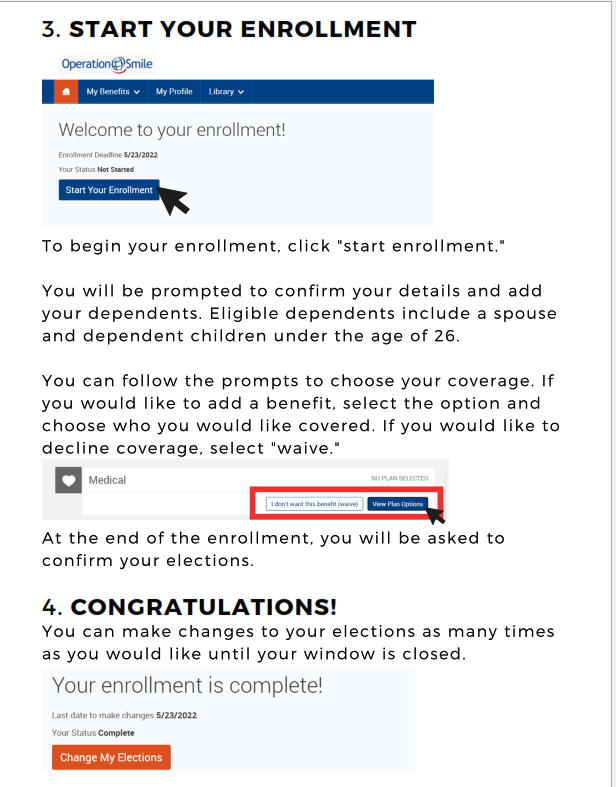
3.START YOUR ENROLLMENT To begin your enrollment, click “start enrollment. ” You will be prompted to confirm your details and add your dependents. Eligible dependents include a spouse and dependent children under the age of 26. You can follow the prompts to choose your coverage. If you would like to add a benefit, select the option and choose who you would like covered. If you would like to decline coverage, select “waive. “
4.CONGRATULATIONS! You can make changes to your elections as many times as you would like until the window is closed.
Enrollment is Easy…and Just a Click Away
Below are a few reminders and helpful hints to help you through the process:
- All benefit-eligible employees need to enroll to receive benefits in 2026.
- Don’t want benefits? You still need to log in and assign beneficiaries when prompted as well as decline coverages.
- New hires must enroll within 30 days of their hire date. And newly benefit-eligible employees must enroll within 30 days of the date they become benefit eligible. Keep in mind that once benefit elections have been submitted, changes to selections cannot be made until the next annual enrollment period.
- Once you are ready to enroll, you will need:
- Your ID and password.
- Social Security numbers and dates of birth for any covered dependents.
- Beneficiary information, such as names, date of births, addresses and Social Security numbers.
Enroll Online
You will be required to either elect or waive each benefit.
To enroll, log into Paylocity Then follow these easy steps.